Hypic AI Prompt Generator

History:

    Editing photos professionally can be tricky. Sometimes, it’s hard to find the right words to tell an AI exactly what you want. That’s where the Hypic AI Prompt Generator comes in. This tool helps you craft precise, ready-to-use prompts for Hypic AI, so your photos get the perfect lighting, color grading, and mood every time.

    With just a few clicks, you can select the type of photo, the style of editing, and the lighting or mood. The generator instantly gives you a detailed prompt that’s ready to copy and paste into Hypic AI. No guesswork, no trial and error, just faster, better results.

    How to Use the Hypic AI Prompt Generator

    • Select the type of photo you want to edit – portrait, selfie, landscape, product photo, or creative scene.
    • Choose your editing style – cinematic, dreamy, natural, dramatic, or futuristic.
    • Pick lighting or mood settings – soft, golden hour, HDR, neon, or pastel tones.
    • Click “Generate Prompt.” The tool instantly creates a professional AI prompt tailored for your image.

    The tool saves your last few prompts and lets you copy them with one click. You can even generate random prompts to explore new ideas or inspiration.

    Why Use Hypic AI Prompts

    Using structured prompts with AI editing tools can completely change your results. Instead of relying on guesswork:

    • You get better color enhancement.
    • Achieve professional lighting effects instantly.
    • Improve background details naturally.
    • Create a cinematic visual style that stands out.
    • Save time with faster editing workflows.

    Here are some handpicked prompts to give you an idea of how powerful structured prompts can be. You can use them directly or generate better ones using the tool above.

    Portrait Prompts

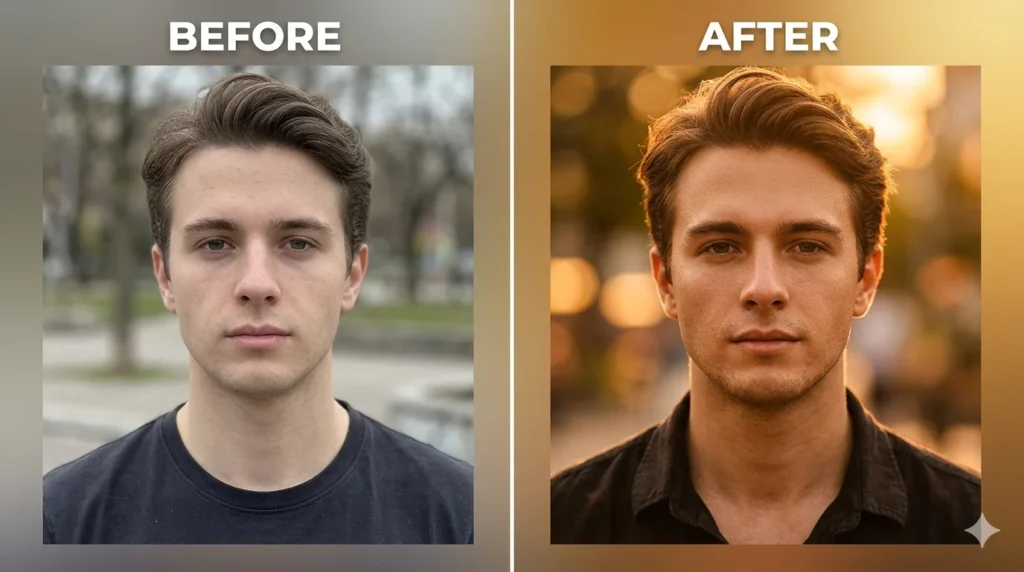
    • Create a cinematic portrait with golden hour lighting and soft background blur.
    • Enhance this portrait with studio lighting and natural skin tones.
    • Add soft dreamy lighting with professional color grading.

    Selfie Prompts

    • Enhance this selfie with bright lighting and smooth skin tones.
    • Add Instagram-style color grading with soft glow effects.

    Landscape Prompts

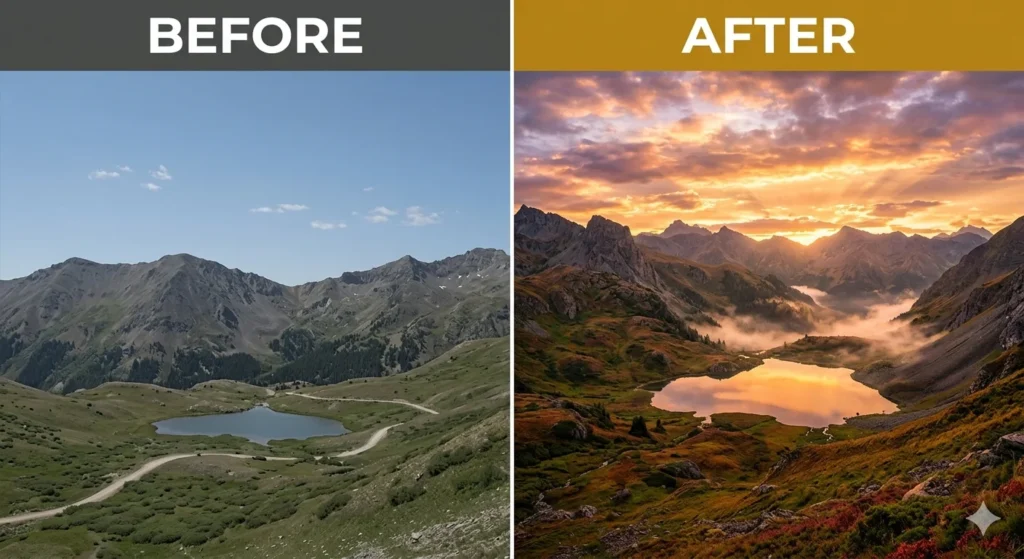
    • Create a cinematic landscape with dramatic sky and vibrant colors.
    • Add soft fog and a dreamy atmosphere to the scene.

    Creative Prompts

    • Add neon cyberpunk lighting with a futuristic atmosphere.
    • Transform the image into a cinematic movie-style scene.

    Extra Prompts

    • Add warm sunset tones with soft cinematic lighting.
    • Improve brightness, contrast, and clarity for a polished look.

    Social Media Prompts

    • Enhance colors for an Instagram-ready aesthetic look.
    • Improve sharpness and clarity for social media posts.
    Hypic AI prompt portrait before and after comparison with cinematic lighting and color grading
    Hypic AI prompt landscape before and after comparison with cinematic sky and vibrant colors

    The Hypic AI Prompt Generator is your shortcut to professional photo edits. Whether you’re a beginner or a seasoned creator, this tool helps you craft powerful, precise prompts for Hypic AI that save time, improve quality, and unlock your creative potential.

    Start generating prompts today and take your photos to the next level—better lighting, better color, better results, every time.

    Frequently Asked About BlueStacks Emulator

    Hypic AI Prompt Generator is a simple tool that helps you create optimized prompts for photo editing in Hypic. Instead of guessing what to write, it generates ready-to-use prompts that improve lighting, colors, and overall image quality.

    The tool combines different elements like photo type, style, and lighting to create a complete AI prompt. You just enter your idea (or leave it empty), click generate, and it instantly gives you a professional prompt.

    Yes, you can copy the generated prompt and paste it directly into the Hypic app. The prompts are designed to work with AI photo editing features for better results.

    AI tools work based on instructions. A well-written prompt helps the AI understand exactly what you want, which leads to better lighting, improved colors, and more professional-looking images.

    Yes, the Hypic AI Prompt Generator is completely free. You can generate unlimited prompts without any restrictions.

    Absolutely. The tool is made for everyone, even if you have no experience in photo editing. Just click a button, and you’ll get a ready-to-use prompt.

    You can create prompts for portraits, selfies, landscapes, product photos, social media posts, and creative edits. The tool automatically mixes styles and effects to give unique results every time.


    You can create prompts for portraits, selfies, landscapes, product photos, social media posts, and creative edits. The tool automatically mixes styles and effects to give unique results every time.